Studio Help
Please note: Our design studio software works best on Desktop computer screens, or iPad screens (landscape orientation) Designing a calendar on a mobile phone is NOT recommended.
{|STUDIO_CANVAS_CUSTOM_HELP|}
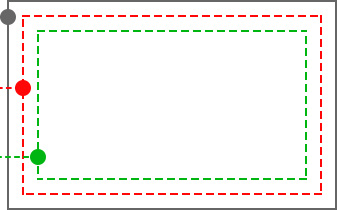
{|STUDIO_CANVAS_LABEL_BLEED_LINE|}
Extend background color or artwork to this line to avoid any white edges from the trimming process.
{|STUDIO_LEFT_PANEL_LABEL_CUTMARGIN|}
This is where we aim to trim the product. The actual line can vary due to the trimming process.
{|STUDIO_LEFT_PANEL_LABEL_SAFEMARGIN|}
Keep text and important imagery within this line to ensure it does not get cut off during trimming.
{|STUDIO_IMAGE_PROPERTY_LABEL_QUALITY_HIGH|} The image is of excellent quality and will not be affected when printed
{|STUDIO_IMAGE_PROPERTY_LABEL_QUALITY_MEDIUM|} The image is of OK quality and may be affected when printed in large format
{|STUDIO_IMAGE_PROPERTY_LABEL_QUALITY_LOW|} The image is of bad quality and will be affected when printed
{|STUDIO_IMAGE_PROPERTY_LABEL_QUALITY_VECTOR|} The Image is a vector so no matter how much you Zoom In or Zoom Out the image its resolution remains unchanged.
Shortcuts
{shortcuts}